Community Nursing DVA claims
CESoft supports DVA claiming for Community Nursing. DVA contracted Community Nursing providers can claim for services retrospectively at the end of each 28-day claim period using item numbers listed on the Schedule of Fees. CESoft allows you to easily capture all the required information to submit electronically to DVA for rapid payment every 28 days.
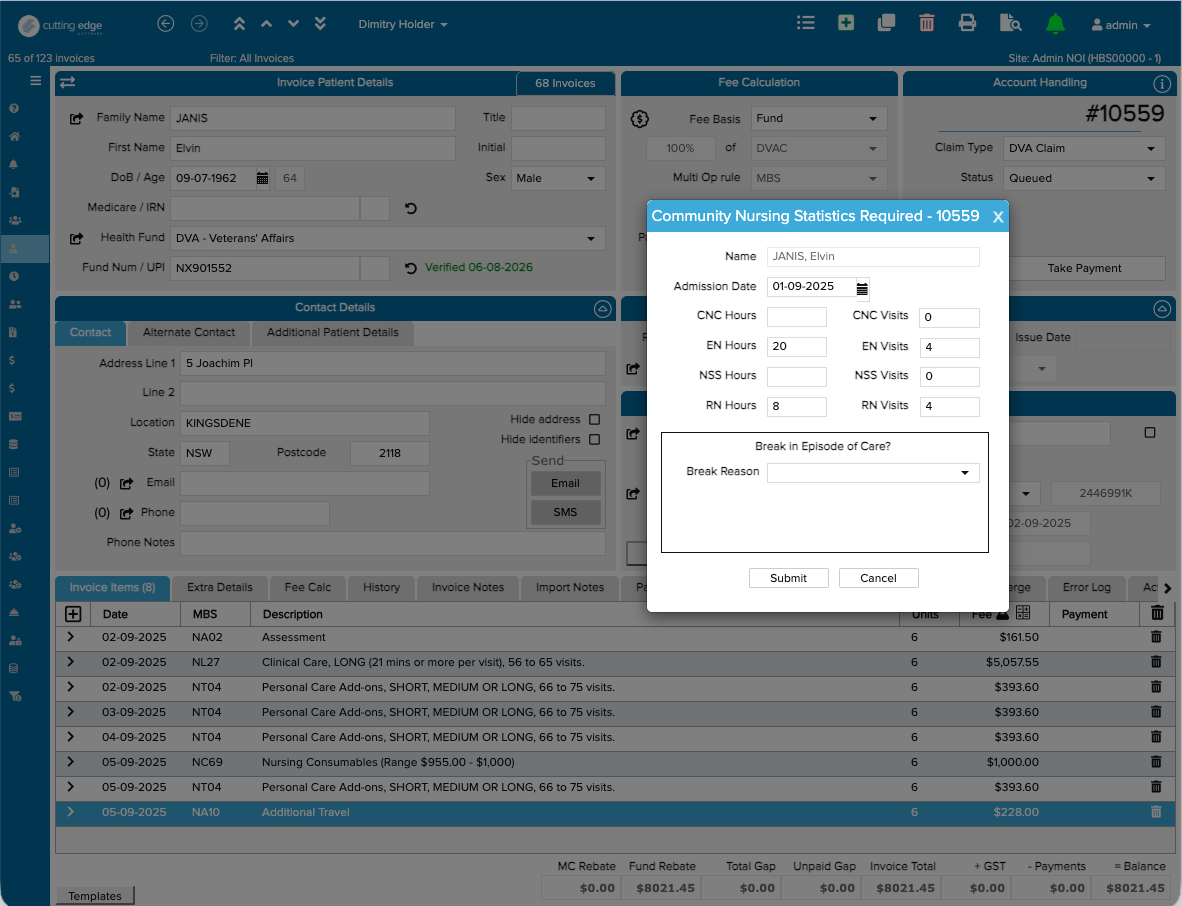
Simply add the DVA Community Nursing items that you need to invoice for, click "ADL Info", fill out the stats page and click submit. CESoft will calculate all fees using the current DVA Community Nursing schedule. Once the software has checked for completeness of data, your invoice will get submitted to DVA for processing and payment. Typically this occurs overnight, with payment going directly to your nominated account. CESoft fetches processing reports directly into the History tab of the invoice for easy checking when DVA rejects or reduces certain items.
More information
https://www.dva.gov.au/providers/community-nursing-services-and-providers/community-nursing-services-general-information
Related Articles
DVA Claims
In Cutting Edge you can submit DVA claims electronically, much like any other claim. Simply create a new invoice, enter the patient name and DOB then select DVA as the fund. In most cases CE will look up the Veteran's File Number for you, but if not ...
Refunding DVA claims
It is possible to refund DVA claims which have been sent in error or for other reasons. Go to: Services Australia Forms https://www.servicesaustralia.gov.au/mo057 Complete Form: Voluntary Acknowledgement of incorrect payments. Complete a separate ...
Types of Online Claims
The Health Fund you've selected on an invoice will dictate which claim type (Medicare, DVA or Private Health) is used. This also sets the Fee Calculation to the correct value. Bulk Bill Claims Electronic Bulk Bill claims allow you to claim the MBS ...
Claims with incorrect information
Most claims can't be cancelled electronically Once a claims has been submitted you should wait to see if it gets paid. If it is, contact the fund to amend the invoice. The fund will also advise medicare. If the invoice is rejected you can then amend ...
NIB Claims - Overseas & Manual Claims
As of June 2023 - NIB will no longer accept manual claims. All claims need to be submited via Eclipse. If you have any issue with a verification - contact NIB 1300 853 530 For deceased patients, Cutting Edge will do a verification based on the date ...